Framework activity
See which outbound call held up the request
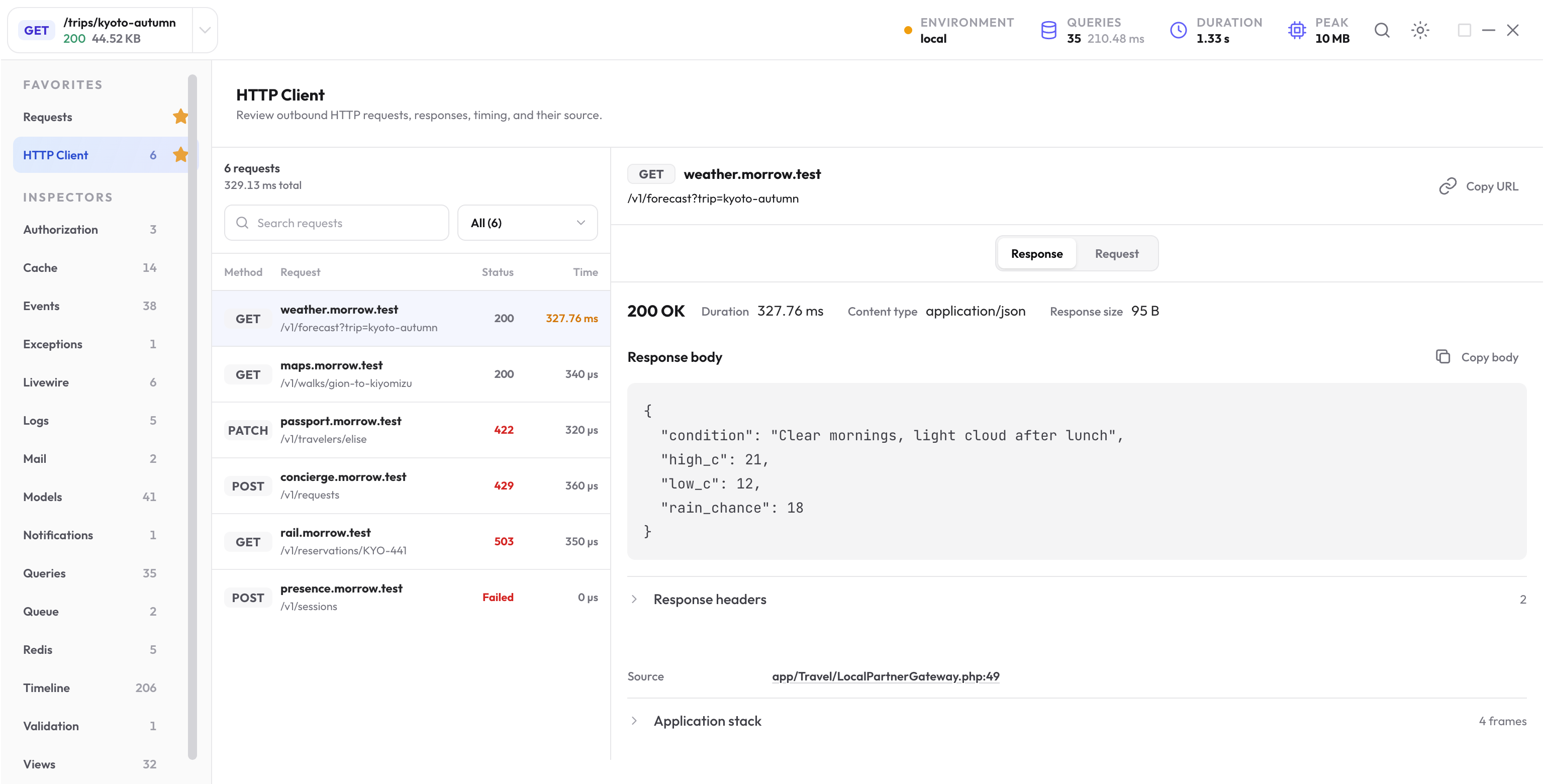
The New Debug Bar connects Laravel HTTP client requests to their response, duration, failure state, redacted payload, and application call site.
Inspect the request and response together
For supported Laravel HTTP client activity, the inspector retains method, safe URL, status, duration, bounded request and response headers and bodies, failure details, and a short application stack.
Separate remote wait from local work
The inspector summary totals observed outbound HTTP duration. A call at or above slow_http_request_ms is marked as slow; the default threshold is 250 milliseconds.
Use the Timeline to see whether calls run one after another, repeat with similar URLs, or sit beside expensive local work. Then decide whether the source can batch, cache, defer, parallelize, or avoid the call.
Distinguish HTTP responses from connection failures
- A completed response has an HTTP status and retained response details.
- A connection failure has no response status and includes the safe exception class and failure state.
- An application may accept a non-2xx status, so compare the status with the code path and expected remote contract.
- Retries can create several calls; inspect their order, URLs, duration, and source before treating them as duplicates.
Open the application call site
Follow the first useful application frame into the service, action, job, controller, or client wrapper that sent the request. Inspect its timeout, retry policy, payload construction, and handling of non-success statuses.
When several calls share the same wrapper, move down the retained stack to the caller that decided this request needed the remote data.
Verify the behavior, not only duration
Repeat the same request with a controlled remote response or Laravel HTTP fake. Confirm call count, method, safe URL shape, status handling, fallback behavior, and request result before comparing duration.
Example: one retry, then a successful response
Use a controlled sequence in a local example route to see how retries appear:
use Illuminate\Support\Facades\Http;

Http::fake([
    'partner.example.test/*' => Http::sequence()
        ->push(['error' => 'busy'], 503)
        ->push(['available' => true], 200),
]);

$response = Http::retry(2, 0)
    ->get('https://partner.example.test/availability');
Inspect the two attempts in execution order. The first has an HTTP 503 response; the second has a 200 response. A connection failure is different because it has no response status.
Verify both the final response and the number of requests. In a focused test of this fake sequence:
expect($response->ok())->toBeTrue();
expect($response->json('available'))->toBeTrue();
Http::assertSentCount(2);
Read retained bodies and copied cURL carefully
The inspector can show bounded text or JSON request and response content. Multipart and binary bodies are omitted. Common credential fields and sensitive keys are redacted before storage.
A copied cURL command represents retained content. It may need your local authentication or omitted body content restored before it can reproduce the real request. Read the command and its limitations before using it.
Keep the remote contract while improving it
If the call is slow, use Performance to check how it affects the whole request. Test status handling, retry count, fallback data, and the app’s returned behavior before accepting a timing improvement.
Next step
Place remote time in the full request
Use the request overview and timeline to compare outbound waits with database, rendering, and other application work.
Open the performance guide